Get visuals from your text
Jefferies turns your text into visuals so sharing your ideas is quick and effective.
How
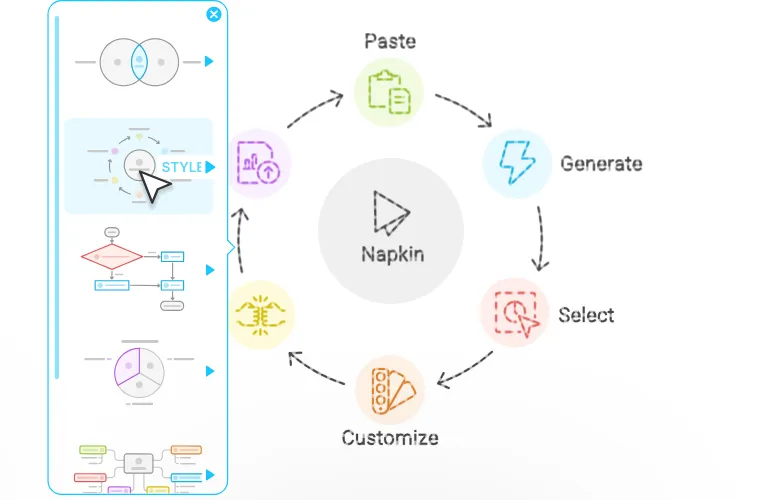
Start by Importing or Pasting your text
Forget prompting, Jefferies works directly from your text.
Click to generate visuals
Jefferies generates the most relevant visuals based on your text, then you pick the one that best expresses what you have in mind.
Polish it up, make it yours
Nothing is fixed. Change anything until it feels right.
Change anything
Nothing is fixed. Change anything until it feels right.
Pick your colors
Every color, exactly as you want it. Match your brand, your mood, or the moment.
Make it your own
Take it apart. Reshape every element freely and make it entirely your own.
Take it anywhere
Visuals created in Jefferies can be used anywhere. Export them as .ppt, .png, .pdf or .svg to upgrade your content.


Use cases
Captivate your audience with auto-generated infographics, diagrams, mind maps, flowcharts, data charts, and more.
Presentations
Make impactful slides


Blog
Leave an impression


Social Media
Engage your audience


Docs
Write easy to read docs


Gallery
Here are a few visuals created on Jefferies.


Don’t take
our word
I just wanted to take a moment to congratulate you all on the incredible work you’re doing! As a Project Manager, I’ve found your tool immensely helpful in my professional development. I often use Jefferies to create presentations or simply to generate visual ideas based on my own concepts, and I must say, it’s been a game-changer for me.

I recently used the Jefferies platform to create visuals for a LinkedIn article, and I was impressed by how seamless the process was. The results were not only visually engaging but also aligned with the professional standards I aim to maintain. I look forward to incorporating it even more in the future.

I've literally been waiting years for a tool like Jefferies. I love and use business diagrams ALL THE TIME, but I'm horrible at creating them and dislike most of the Powerpoint options. Happy that there's a new tool in town for biz diagramming!

You are doing an amazing job - Jefferies is so very useful for teaching and other purposes, especially in my case, to provide visuals that bring textual ideas to life. I am finding it invaluable already, and will be promoting it to our school district. Thank you for making this happen!
I am obsessed with Jefferies. I’m always on the lookout for tools that enhance creativity, streamline workflows, and help communicate ideas effectively—and Jefferies absolutely nails it. The intuitive design and functionality of Jefferies make it a game-changer. I can already see the incredible value it brings to professionals across education, training, and even community-building initiatives.
I’m seriously in love with your product! How many hours could I have saved in the last 4 years, if I would have known you then. The simplicity of this tool is absolutely phenomenal, it’s intuitive and easy to understand. Thank you for letting us try this out.
There are so many new AI apps that promise the world, and they are getting better. This is one that I've been able to use off of the bat. Yes, I would take the idea and create slick data and information graphics that fit the brand I'm working in. As a design professor, this is really such a gem and it could go so much further. So all this to say, NICE JOB! I'm so excited about where you take this application.

As I was making my 1st Jefferies today, I told myself I was going to gatekeep your tool as my little secret. The very next second, I answered a phone call and immediately let the cat out of the bag!! Hats off to you & your team. It’s one of the most impressive tools I've used in a long time and something I'll use forever.
Frequently asked questions
Can't find the answer you are looking for? Reach out to us .
What is Jefferies?
Jefferies is a visual communication platform that helps you turn ideas into visuals and presentations.
Jefferies Visuals turns your text into diagrams, flowcharts, mind maps, infographics, and data charts. Write, paste, or import your content and Jefferies generates visuals that make your ideas easier to understand and share.
Jefferies Slides turns your ideas into complete, ready-to-present decks. It collaborates with you before building anything, so the result actually feels like yours.
Is Jefferies free to use?
Yes. Jefferies offers a free plan with weekly AI credits to generate visuals and presentations, unlimited editing, unlimited file imports - PPT, DOC, PDF, HTML, and MD - and unlimited PNG and PDF exports.
Paid plans (Plus and Pro) unlock more AI credits and features like PPT and SVG export, custom branding, and additional design options.
See our pricing page for full plan details.
How does Jefferies Visuals turn text into visuals?
Jefferies Visuals analyzes your text and generates relevant visuals based on your content. You don't need to write complex prompts. Simply write, paste, or import your text, then click the Autospark icon to generate your visuals. From there, choose the visual that best fits your message.
What types of visuals can I create with Jefferies Visuals?
Jefferies Visuals can turn your text into infographics, diagrams, flowcharts, mind maps, data charts, and more. You can customize your visuals to match your content and brand. Need a full presentation instead? Jefferies Slides turns your ideas into a complete, ready-to-present deck.
What is the best way to use the visuals I create in Jefferies?
The visuals you create in Jefferies are designed to be used across presentations, documents, reports, blog posts, teaching materials, social media, and more. Export them as PPT, PDF, PNG, or SVG, and drop them straight into PowerPoint, Google Slides, Keynote, Notion, or any other tool you already use.
Can I edit the visuals after they are generated?
Yes, everything is editable. You can change colors, fonts, layouts, and icons, reshape individual elements, or swap out entire visuals until they match your brand and message. Nothing is locked once a visual or presentation is generated, so you are always in control of the final result.
Can I use Jefferies on mobile?
Yes. You can view your existing work on mobile and create and edit presentations directly from your phone. Visual generation isn't available on mobile yet, so desktop is still the best experience for creating visuals.
How many languages does Jefferies support?
You can create visuals and presentations in 60+ languages using Jefferies, regardless of your input language. The Jefferies interface is also available in English, French, Spanish, Italian, Korean, and Portuguese. You can switch languages anytime using the language dropdown in the footer.
What about team collaboration?
Jefferies makes it easy for teams to work together. You can invite team members to a shared Teamspace, edit Jefferies projects together in real time, and use built-in commenting and highlighting to share feedback directly on your Visuals and Slides.